Hello, AWS Transform!
Getting Started with .NET on AWS: AWS Transform for .NET

This episode: AWS Transform and agentic .NET app modernization. In this Hello, Cloud blog series, we're covering the basics of AWS cloud services for newcomers who are .NET developers. If you love C# but are new to AWS, or to this particular service, this should give you a jump start.
In this post we'll introduce AWS Transform and give an overview of how to port a .NET Framework application to modern .NET on Linux.
AWS Transform : What is it, and why use It?
“Some people don't like change, but you need to embrace change if the alternative is disaster." —Elon Musk
"They always say time changes things, but you actually have to change them yourself." —Andy Warhol
As time passes, software applications that were once satisfactory become less so. That’s due to never-ending change: our devices and online access patterns change, customer expectations change, business requirements change, architectures and frameworks go in and out of fashion, and platforms reach the end of their lifetime.
.NET Framework applications are in that last category. While .NET Framework continues to be supported on Windows, the platform is no longer advancing and ended with version 4.8.1. Its successor is cross-platform .NET Core, now known as .NET, which is very much alive. Whereas .NET Framework apps could only run on Windows, modern .NET apps can run on Linux, macOS, or Windows. By modernizing your .NET Framework Windows apps to modern .NET on Linux, you can reduce operating costs by up to 40%. Modern .NET also performs better, giving you increased capacity with less infrastructure. Modern .NET is an active platform that continues to advance, whereas .NET Framework is frozen. For all these reasons, your stranded .NET Framework apps need a lifeboat to Linux.
However, modernizing .NET Framework apps is not easy. It requires code analysis, handling code incompatibilities with modern .NET or Linux, porting code, validating the results, and updating deployment. These labor-intensive activities have to be repeated for all of the legacy apps in your portfolio. Without automated assistance, you could be in for a great deal of work to modernize your .NET apps.
AWS Transform is AWS’s AI service for enterprise modernization. AWS describes it as “the first agentic AI service developed to accelerate enterprise modernization of .NET, mainframe, and VMware workloads“. In this post, we’ll focus on AWS Transform for .NET (hereafter ATX.NET), which can help modernize your .NET apps, whether you need to port .NET Framework to modern .NET, or upgrade modern .NET to a later version such as .NET 8. With it, you can speed up your .NET modernization work by to 4x, with the service taking on the lion’s share of porting work. It is suitable for large-scale modernization, and can port as many as 100 solutions in parallel. ATX.NET is also enterprise-ready: it supports federated security though IAM Identity Center and has collaboration features.
ATX.NET can port these kind of .NET projects: class libraries, console apps, MVC projects (including Razor views UI), WCF services, and Web API. Only C# projects are supported at present. During transformation, ATX.NET applies both rules-based porting from a knowledge base as well as LLM-based porting. The service iteratively analyzes build errors, generates prompts to LLMs like Claude and Nova, and applies fixes, with the intent of getting build errors to zero.

At present, there is no cost to AWS customers for using AWS Transform for .NET. It’s possible future capabilities may include paid features.
There are two ways to use AWS transform: web console and IDE. Let’s take a look at each. Rather than my usual tutorial, I’ll give an overview of the experience in this post because several good walk-through posts are already available. For a complete step-by-step tutorial, see the blog post Modernize .NET applications at scale with AWS Transform for .NET and the resources linked at the end of this article.
Web console: large-scale modernization and collaboration
For large-scale porting and collaboration, use the web console. You can create workspaces and invite participants for cross-team collaboration. Transformation works at the repository level. You set up repository connectors to your GitHub, GitLab, Bitbucket, or Azure repos. ATX.NET will read code from your source repositories but not change them. Ported code is written to new branches, where it can be reviewed and approved.
Sign in to web console and create a transformation job
Sign in with IAM identity center. Your organization enables AWS Transformation in the AWS console, and configures users with IAM Identity Center. Each authorized user can then access the AWS Transform web console, where they can perform transformations and collaborate. This is not the AWS console, but a separate web console experience.
Workspaces for collaboration. In the web console, you create a workspace in which you can run transformation jobs. You can invite others to the same workspace so that you can collaborate.
Chat and HITL interactions. You can chat in the web console. You’ll use chat to start a transformation job, respond to questions, and ask queries about assessment findings and transformation activity. The web console will show your job plan steps on the left, status in center (with Dashboard, Collaboration, and Worklog tabs), and a chat panel at right. At times, Human In The Loop (HITL) interactions are needed, and the console will alert you and prompt for input.
Setting up a transformation job
When you are ready to perform a transformation, simple state your intent for .NET transformation you will be guided to set up a transformation job. You transformation job will advance through these steps to set up the transformation, which you’ll see in the left pane.
Get resources to be transformed. In this step you can set up repository code connections, for example to your GitHub repos. This includes an approval step by an administrator in your organization. Once your code connector(s) are approved, you can proceed with your transformation job.
Discover resources for transformation. ATX.NET will scan the repositories you’ve set up and provide a list of repos for transformation. You can review the list and choose whether to transform all or a subset of these repositories for assessment. The repositories you selected are then assessed. A downloadable assessment report describes the .NET solutions and projects found in those repositories and their characteristics, such as .NET versions, number of projects, lines of code, and number of NuGet dependencies. You can also use chat to ask questions about the assessment report. See AWS Transform for .NET now supports chat about assessments and transformations for examples.

Prepare for transformation. If your repositories are missing any dependencies, you can choose to upload missing dependencies or ignore them.
Transformation
With your job set up and approved, the repositories you selected are transformed in bulk, up to 100 of them at a time. Transformations can take minutes to hours. The maximum time for a job is 12 hours,
Transform. As the transformation runs, you can monitor status with several views in the center of the web console. The dashboard tab shows repository progress and outcomes, through charts and a repository table. The Worklog tab shows a log on ongoing activity.

Transformation summary report. At completion of transformation, you can download a transformation summary report. This gives you an overview of transformation activity, including which projects were fully transformed, partially transformed, or could not be transformed. You can also use chat to ask questions about the transformation report.
Once an ATX.NET job completes, developers can review the code changes for approval, which have been written to a new writable branch in your repositories.
IDE: transform one solution at a time
The other way to access ATX.NET is from Visual Studio, with the AWS Toolkit for Visual Studio 2022 installed. Developers can transform one solution or project at a time from their IDE. In this mode you are transforming solutions on your local file system.
Sign-in. Open the solution you wish to transform in Visual Studio. From the Extensions menu, open the AWS Toolkit > Getting Started page and sign-in. You can sign in with AWS Transform through IAM Identity Center (just as the web console does), or with an Amazon Q Developer subscription, or with an AWS Builder Id.
Open a code file. To do transformation work, you’ll need to open a C# code file. That’s necessary for the Language Server Protocol (LSP) integration that drives the transformation.
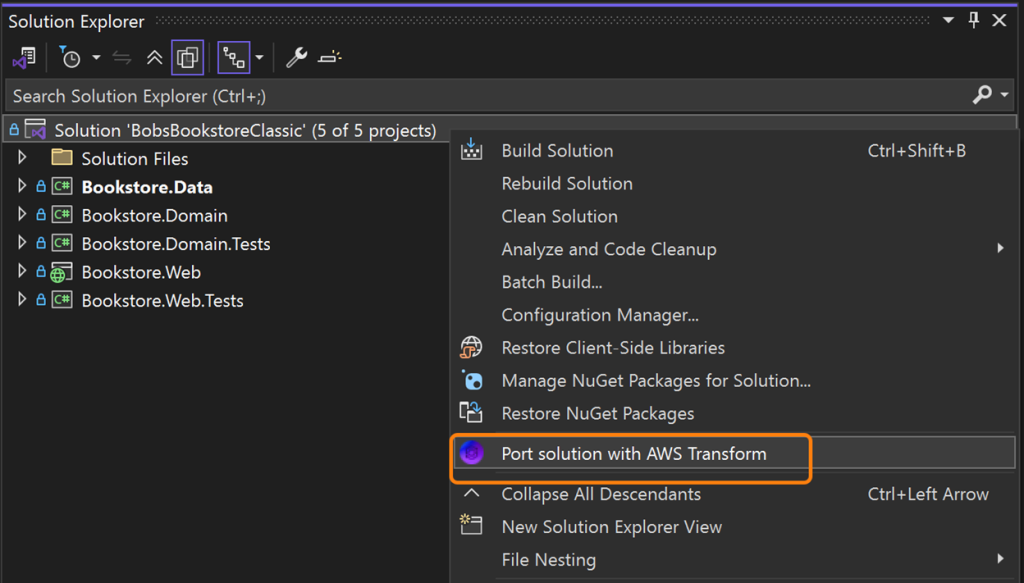
Select transform action. In Solution Explorer, right-click the solution or a project and select Port with AWS Transform. A confirmation dialog will appear for you to select the target .NET version and review job options. Click Confirm to begin the transformation.
Transform. AWS Transform verifies that it can build your code, and then starts a transformation job. You’ll see a transformation plan display. Notifications at the top of Visual Studio will tell you when the job starts and when it completes.
Review transformation summary and code diffs. At job completion, a transformation summary view shows the results for each project, including counts of file changes, package changes, and API changes. You can view the code diffs for these changes, and apply some or all of them to update your solution.
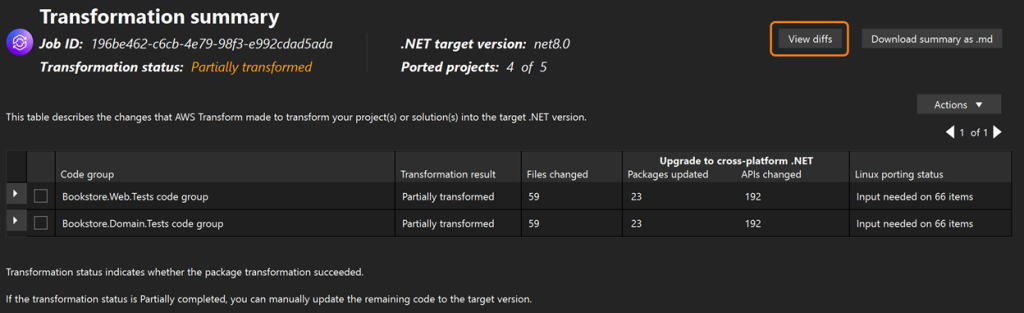
Transformation reports. At completion of transformation, you can download a transformation summary report. This gives you an overview of transformation activity, including which projects were fully transformed, partially transformed, or could not be transformed. You can also download a Linux Readiness Report, which identifies compatibility issues in moving from Windows to Linux that require human attention.
Completing transformation
At times, there may be manual work needed to complete a transformation. That can happen if your projects have features not yet supported by ATX.NET, if you want to revise the transformed code to meet your organization’s conventions, or if you want to customize the result in some way, such as adding a new feature.
A common pattern is to combine ATX.NET with an AI coding companion such as Amazon Q Developer, Q CLI, or Kiro. For the full modernization journey, think of ATX.NET as the express travel that gets you most of the way there, and your AI coding companion as the local transportation that brings you to your final destination.
Where to go from here
In this post, you learned about AWS Transform for .NET and how to breathe new life into older .NET Framework Windows applications by porting them to modern .NET and running on Linux. Use these resources to learn more about AWS Transform for .NET, then start modernizing your .NET Framework applications. As always, the best way to learn is by doing: try a transformation today.
Product pages and Documentation
Blog posts - announcement & walkthroughs
AWS Transform for .NET, the first agentic AI service for modernizing .NET applications at scale (web console)
Port your .NET Framework applications to Linux with AWS Transform for .NET (IDE)
Modernize .NET applications at scale with AWS Transform for .NET (web console & IDE)
Why organizations around the world are choosing AWS Transform for .NET
Blog posts - features
AWS Transform for .NET now supports chat about assessments and transformations
Accelerating .NET modernization with AWS Transform for .NET and CAST
AWS Transform for .NET now supports connection to Azure Repos and Azure Artifacts
Videos
AWS Transform for .NET (AWS product detail page)
AWS Transform for .NET (Demo) (AWS product detail page)
Introducing AWS Transform: Accelerate .NET modernization with agentic AI (AWS Events YouTube )
Courses
AWS Transform for .NET Getting Started
AWS Transform for .NET - Beyond the Basics
Case studies
How The Hartford jumpstarted .NET modernization with AWS Transform (blog post)
How Thomson Reuters Accelerated .NET Modernization with AWS Transform (video)